What This Project is All About?
Here, I did Web Security static code analysis using Semgrep and SonarQube. The websites that I analyzed here are DVWA which is a vulnerable Fullstack Web App and Kos KaKa Dashboard Backend which is a backend API which is a Backend API for Kos KaKa web app that is created by Volvinco agency for a boarding house in Malang.
Introduction to Semgrep and SonarQube
What is Semgrep?
Semgrep is a free static code analysis tool that quickly checks code for security issues, bugs, and best practices. It works by searching for specific patterns in the code, using rules that you can customize or choose from its large library. Semgrep is easy to set up and use, especially in continuous integration (CI/CD) pipelines, giving fast feedback without needing complex configurations. It supports many programming languages, making it useful for both developers and security teams to keep code safe and high-quality.
 Zoom
Zoom
What is SonarQube?
SonarQube is an open-source tool that helps developers find and fix code issues related to security, bugs, and code quality. It analyzes code across multiple programming languages, providing detailed reports on potential problems and offering suggestions for improvement. SonarQube can be integrated into CI/CD pipelines, allowing teams to continuously monitor their code for issues as they develop. It also supports custom rules and quality gates, enabling teams to enforce coding standards and ensure their code is reliable, secure, and maintainable.
 Zoom
Zoom
Difference between Semgrep and SonarQube?
Semgrep and SonarQube are both tools for analyzing code, but they differ in their approach and focus. Semgrep is a lightweight, fast tool that checks code for specific patterns related to security and best practices. It’s highly customizable, making it easy to define and apply rules across various languages, and it integrates smoothly into CI/CD pipelines for quick feedback. SonarQube, on the other hand, offers a more comprehensive analysis, covering security, bugs, and code quality with detailed reports and metrics. It supports deeper integration into development workflows and provides broader language support, but it requires more setup and resources compared to Semgrep. While Semgrep is ideal for targeted, fast checks, SonarQube is better suited for extensive, ongoing code quality management.
Integration of SonarQube in CI/CD Pipeline
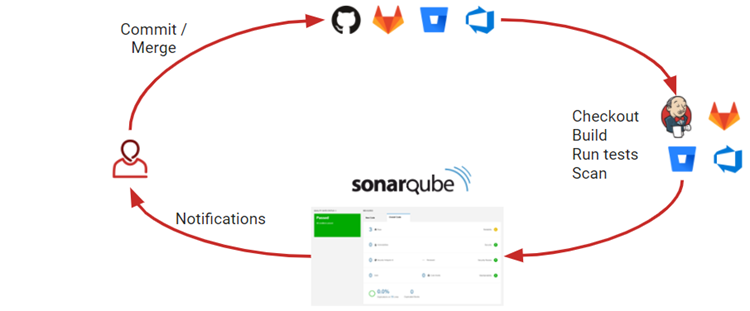
SonarQube could be integrated into a CI/CD pipeline. This means that every time code is committed or updated, SonarQube automatically checks it for issues like security vulnerabilities, bugs, and code quality problems. This integration helps catch problems early in the development process, ensuring that only clean, reliable code is deployed. The results are provided in a detailed report, allowing developers to fix any issues before the code goes live. This continuous checking helps maintain high code standards throughout the development cycle.
 Zoom
Zoom
Semgrep & SonarQube Installation
Installing SonarQube
We’re using linux for SonarQube, we’re going to install it with the linux method but since we’re going to be using Docker, we don’t have to worry about the program requirements, we just have to install Docker.
Requirements:
- PostgreSQL
- Java
Installing Docker
Run the followingdocker-install.sh that I custom created:
#!/usr/bin/env bash

sudo apt-get update -y
sudo apt-get install ca-certificates curl -y
sudo install -m 0755 -d /etc/apt/keyrings
sudo curl -fsSL https://download.docker.com/linux/ubuntu/gpg -o /etc/apt/keyrings/docker.asc
sudo chmod a+r /etc/apt/keyrings/docker.asc
echo \
"deb [arch=$(dpkg --print-architecture) signed-by=/etc/apt/keyrings/docker.asc] https://download.docker.com/linux/ubuntu \
$(. /etc/os-release && echo "$VERSION_CODENAME") stable" | \
sudo tee /etc/apt/sources.list.d/docker.list > /dev/null
sudo apt update -y
sudo apt install docker-ce docker-ce-cli [containerd.io](http://containerd.io/) -y
Installing SonarQube
Run the following sonarqube-install.sh that I custom created:
#!/usr/bin/env bash

sudo docker pull sonarqube
sudo docker run -d --name sonarqube -e SONAR_ES_BOOTSTRAP_CHECKS_DISABLE=true -p 9000:9000 sonarqube:latest
sudo docker start sonarqube
To check whether SonarQube is successfully installed using docker, we can do command $ sudo docker ps
 Zoom
Zoom
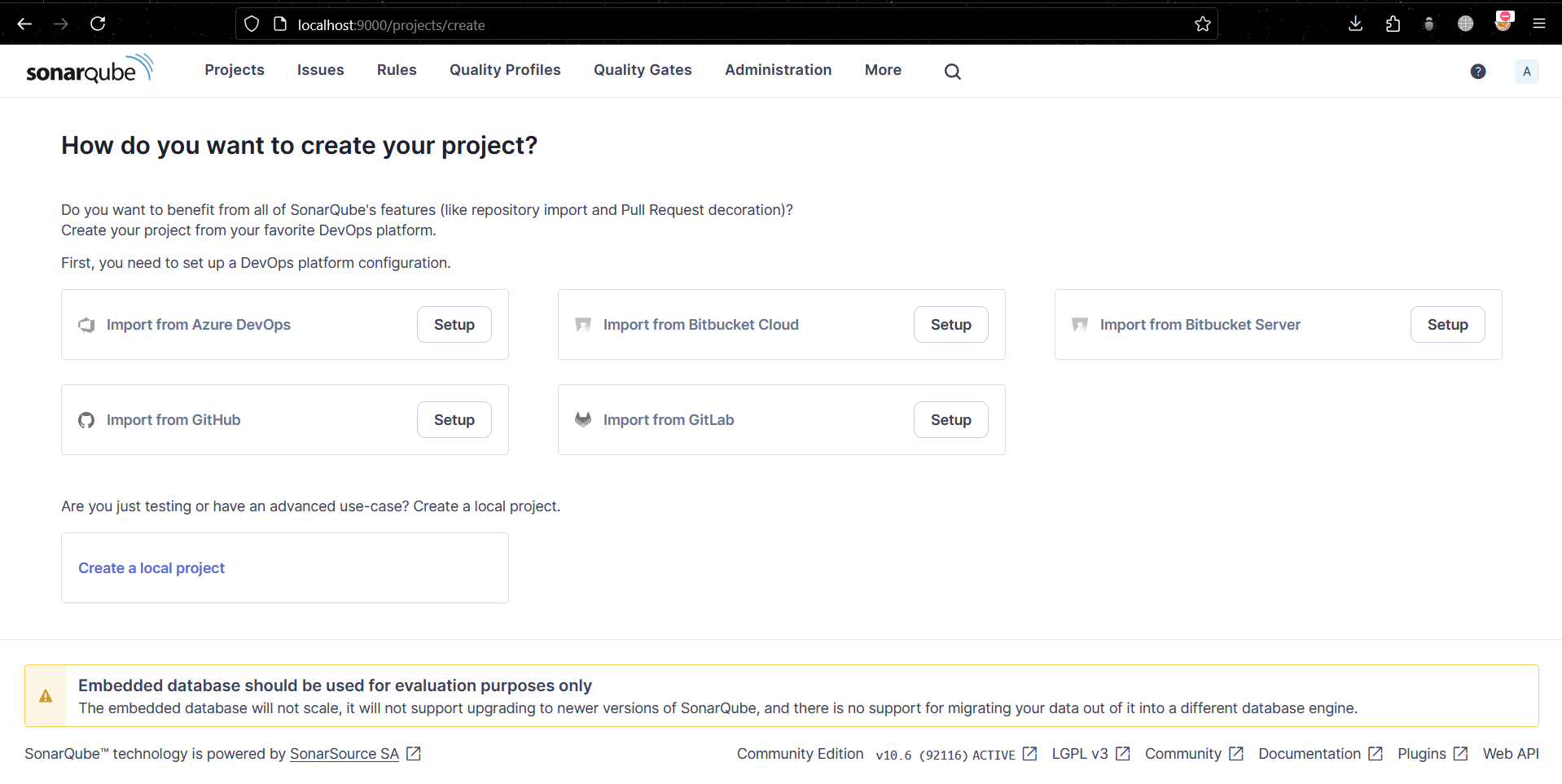
Here’s when we try to access the linux’s docker ip with its port:
 Zoom
Zoom
Installing SonarQube Scanner CLI
Run the following sonarqube-scanner-cli-install.sh that I custom created:
#!/usr/bin/env bash

# install java
sudo apt update -y
sudo apt install default-jre -y
sudo apt install default-jdk -y

# install sonarqube scanner cli
wget https://binaries.sonarsource.com/Distribution/sonar-scanner-cli/sonar-scanner-cli-6.0.0.4432-linux.zip?_gl=1*t4wz3i*_gcl_au*MTg4MTc3NjkwLjE3MTgxMDE2NjQ.*_ga*MTYwMTM4MzAzNy4xNzE4MTAxNjYy*_ga_9JZ0GZ5TC6*MTcxOTIyNTYyNS40LjEuMTcxOTIyNzE4My42MC4wLjA.
mv sonar-scanner-cli-6.0.0.4432-linux.zip?_gl=1*t4wz3i*_gcl_au*MTg4MTc3NjkwLjE3MTgxMDE2NjQ.*_ga*MTYwMTM4MzAzNy4xNzE4MTAxNjYy*_ga_9JZ0GZ5TC6*MTcxOTIyNTYyNS40LjEuMTcxOTIyNzE4My42MC4wLjA. sonar-scanner-cli.zip
unzip sonar-scanner-cli.zip
nano sonar-scanner-cli/conf/sonar-scanner.properties

# sonarqube config
sudo mv sonar-scanner-cli /opt
nano ~/.bashrc
export PATH="/opt/sonar-scanner-cli/bin:$PATH"
cd ~/<project_path>
sonar-scanner \
-Dsonar.projectKey=<PROJECTKEY>\
-Dsonar.sources=. \
-Dsonar.host.url=http://localhost:9000 \
-Dsonar.login=<TOKEN>
Note: you have to change the above values of <project_path> , <PROJECTKEY> and <TOKEN> to your unique values
Installing Semgrep
Since we’re using linux for semgrep, we’re going to install it with the linux method
Requirement: python3.8
Installing Python and pip
Run the following python-install.sh that I custom created:
# Installing python3.8
sudo apt update –y
sudo apt install software-properties-common
sudo add-apt-repository ppa:deadsnakes/ppa
sudo apt install python3.8 python3.8-venv python3.8-dev python3.8-distutils -y

# Installing pip
sudo apt install python3.8-venv python3.8-distutils -y
curl -O https://bootstrap.pypa.io/get-pip.py
python3.8 get-pip.py

# Make python3.8 as default
sudo update-alternatives --install /usr/bin/python3 python3 /usr/bin/python3.8 1

# Installing semgrep
python3 -m pip install semgrep
semgrep login
Scanning The Source Code
Scanning using Semgrep
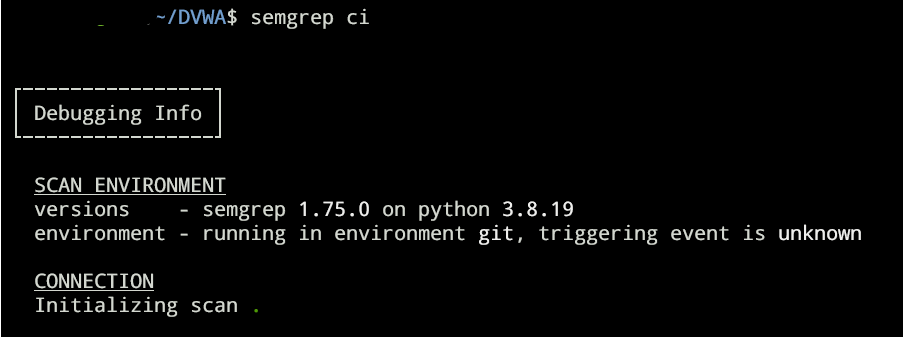
Make sure that we’re in the same directory as the source code that we’re going to scan, then do the following command semgrep ci
 Zoom
Zoom
We can check the result in https://semgrep.dev/orgs/-
DVWA Result
 Zoom
Zoom
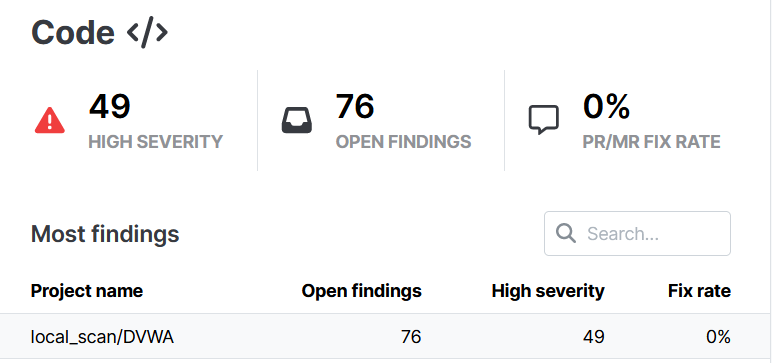
We can see that the code contains 49 high severity vulnerability and there are 76 open findings with DVWA
Here are the vulnerabilities sorted from the highest to lowest severity:
High
- Tainted-command-injection (8)
- Taint-cookie-http-false (2)
- Taint-cookie-secure-false (2)
- Tainted-code-execution (2)
- Tainted-user-input-in-php-script (1)
- Exec-use (8)
- Tainted-sql-string (8)
- Tainted-exec (8)
- Insecure-document-method (6)
- Eval-use (2)
- Md5-loose-equality (1)
- Phpinfo-use (1)
Medium
- Laravel-command-injection (8)
- Laravel-code-injection (2)
- Laravel-native-sql-injection (2)
- Taint-unsafe-echo-tag (1)
- Tainted-filename (11)
- Eval-detected (1)
- Detect-non-literal-regexp (1)
- Unlink-use (1)
Here’s the official result: https://drive.google.com/file/d/1WmT-3xn0XsAEYCUaVwoKs-Hi2HJlnIJa/view?usp=sharing
Kos KaKa Dashboard BE Result
This is a backend web API built using Typescript, Nodejs and Expressjs
 Zoom
Zoom
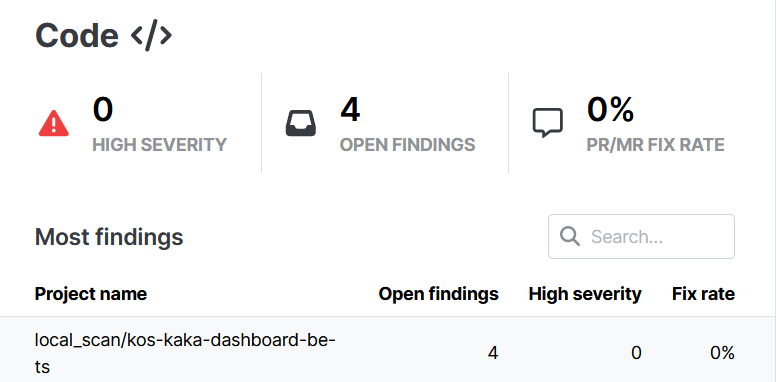
We can see that the code contains 0 high severity vulnerability and there are 4 open findings with Kos-kaka-dashboard-be-ts
Here are the vulnerabilities sorted from the highest to lowest severity:
Medium
- Session-fixation (1)
- Express-path-join-resolve-traversal (1)
- Path-join-resolve-traversal (1)
- Express-res-sendfile (1)
Here’s the official result:
https://drive.google.com/file/d/1WeRye4EvKubYdAXVOXx4bonFdjP4KnqN/view?usp=sharing
Scanning using SonarQube
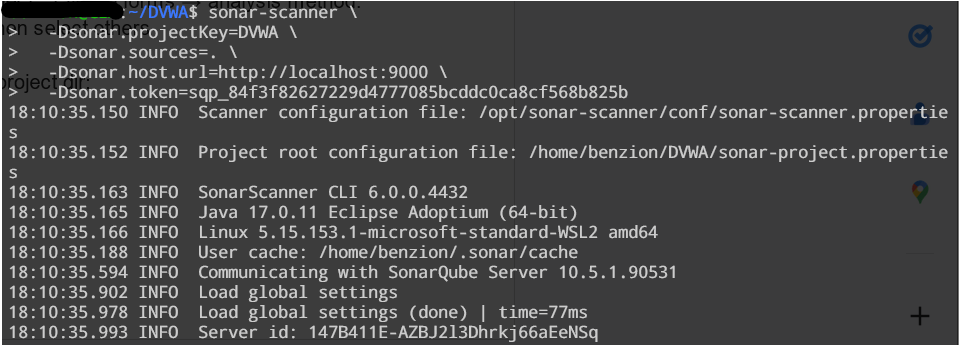
In projects → create project → local project → fill the forms → analysis method: locally → create token → run analysis then select others
Run the following command in the root project dir:
sonar-scanner \
  -Dsonar.projectKey=<project_key> \
  -Dsonar.sources=. \
  -Dsonar.host.url=http://localhost:9000 \
  -Dsonar.token=<sonar_token>
 Zoom
Zoom
Overall Reviews
 Zoom
Zoom
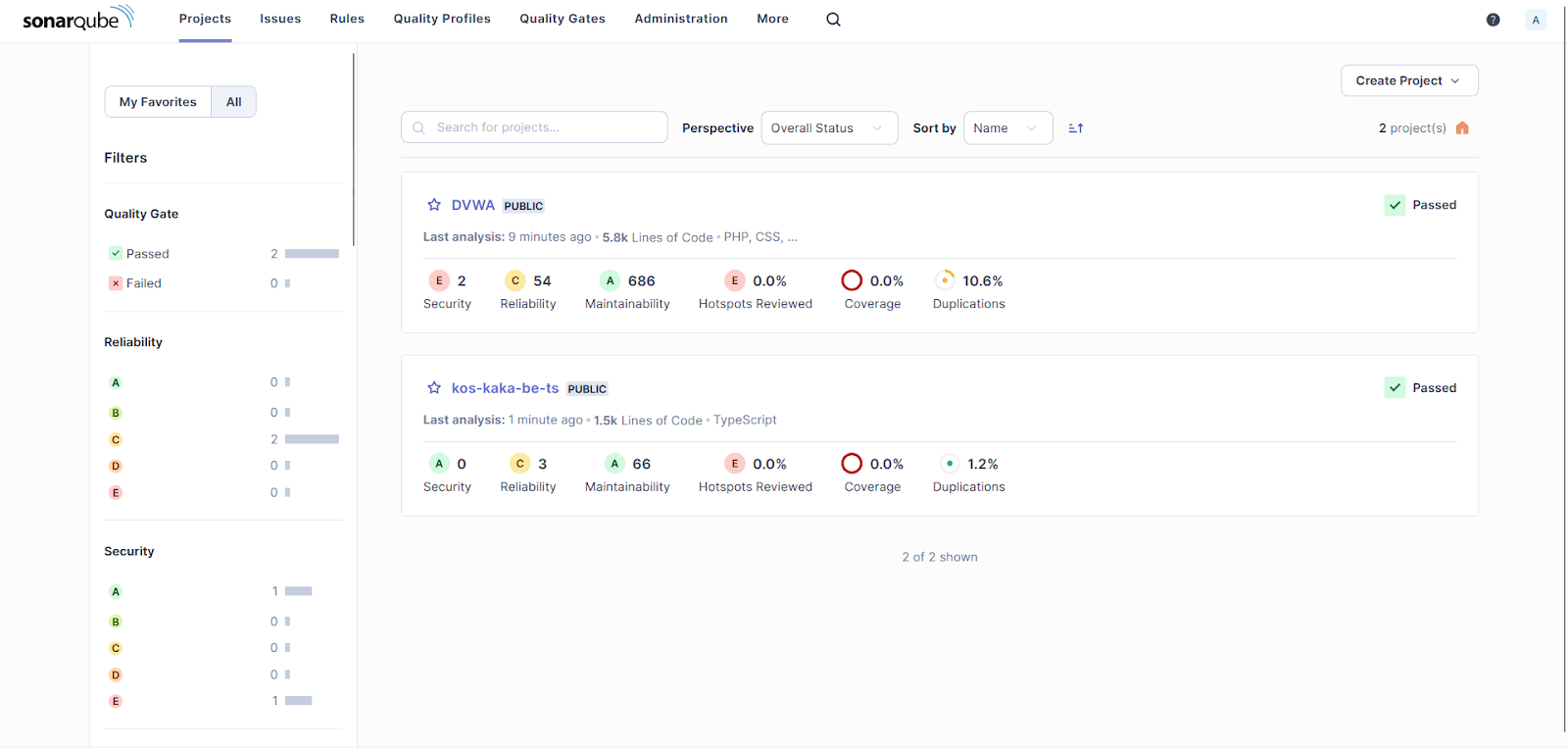
As the overall review:
- 2 projects (DVWA and kos-kaka-be-ts) passes the security gate test
- 2 projects (DVWA and kos-kaka-be-ts) gets c from reliability tests
- 1 project (kos-kaka-be-ts) gets a from security test
- 1 project (DVWA) gets e from security test
- 2 projects (DVWA and kos-kaka-be-ts) gets a from maintainability tests
DVWA
Overall Review
 Zoom
Zoom
From the above image, we can see that DVWA contains:
- 2 security vulnerabilities
- 54 reliability issues
- 686 maintainability issues
- 10.6% duplication issues
Project Details
 Zoom
Zoom
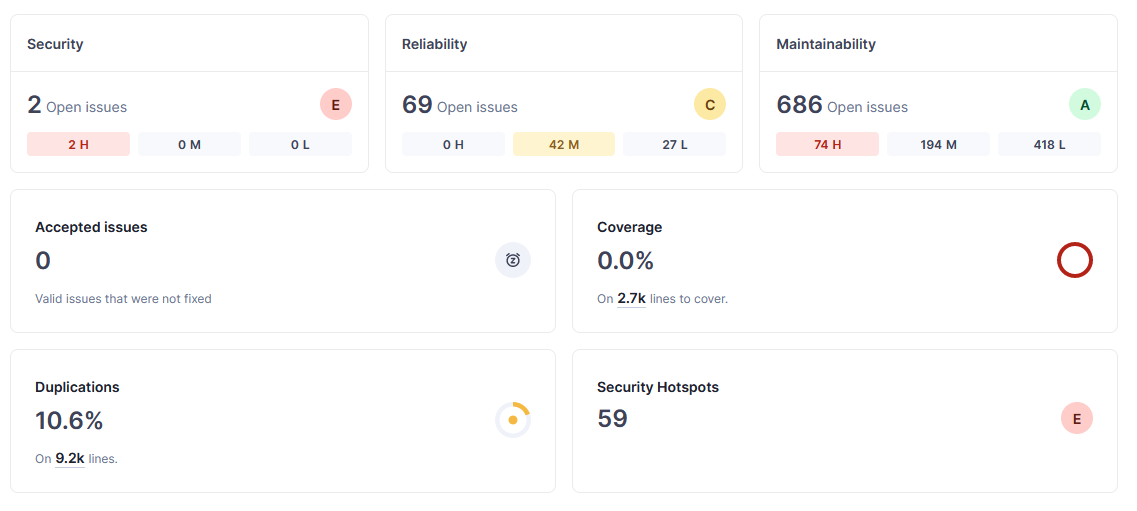
Dari hasil di atas kita dapat menyimpulkan, terdapat:
- 2 high impact security vulnerability
- 42 medium impact software reliability
- 27 low impact software reliability
- 74 high, 194 medium 418 low maintainability problems
- 59 security hotspot
- 10.6% (9.2k baris) duplikasi kode
Problem List
 Zoom
Zoom
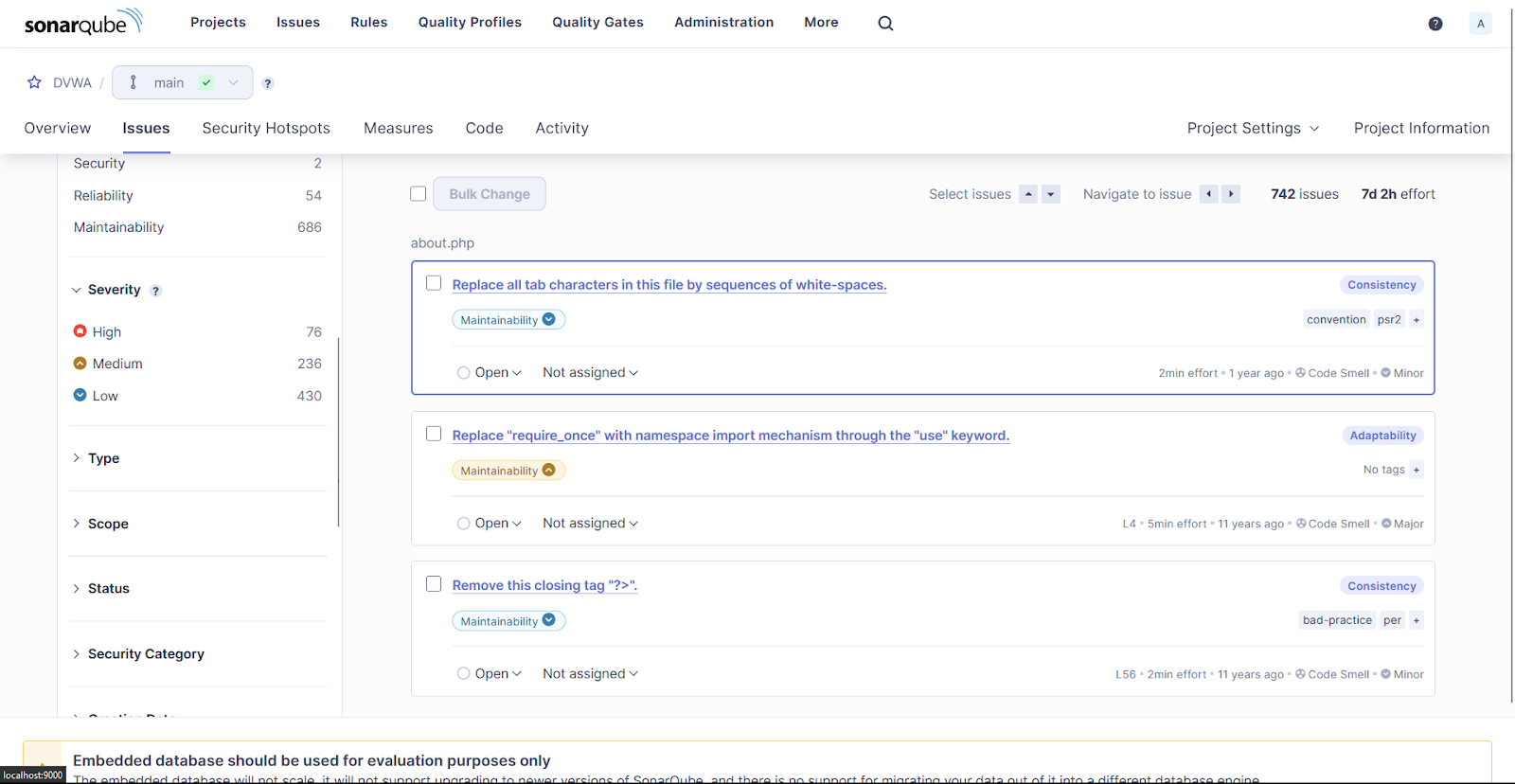
The above result shows that DVWA has at least 742 issues with 76 as severe, 236 medium, and 430 as low.
Pada kali ini, kita akan menganalisis security vulnerabilities yang sifatnya high priorities (jumlahnya ada 2 – authentication dan sql injection):
Authentication
 Zoom
Zoom
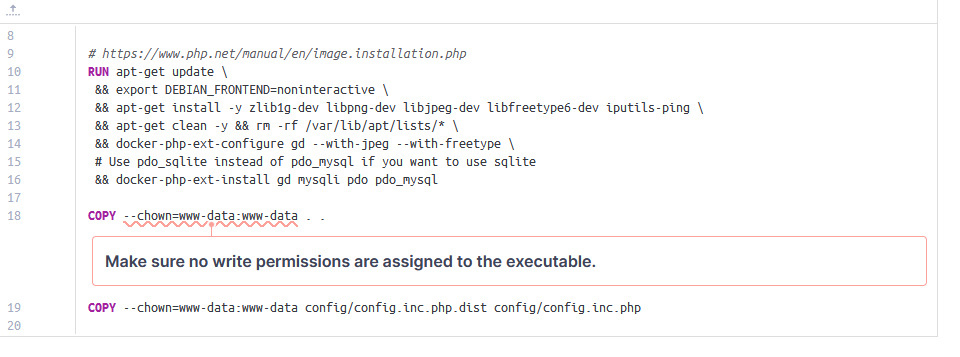
Terdapat vulnerability pada file “Dockerfile” dimana terdapat line
COPY --chown=www-data:www-data
Yang menunjukkan bahwa terdapat permission yang diassign ke executable
Berikut merupakan masalah yang dapat ditimbulkan:
- Izin menulis memungkinkan pelaku jahat, yang memiliki pijakan di container, untuk merusak resource dan berpotensi memanipulasi perilaku yang diharapkan dari container.
- Memanipulasi file dapat mengganggu layanan atau membantu privilege escalation di dalam container.
- Hal ini juga melanggar prinsip immutability kontainer karena memfasilitasi perubahan kontainer selama masa pakainya. Immutability, sebuah best practice container, memungkinkan perilaku container Docker yang lebih andal dan dapat direproduksi.
- Jika pengguna diberi kepemilikan atas suatu file tetapi tidak ada izin menulis, pengguna masih dapat memodifikasinya dengan menggunakan kepemilikannya untuk mengubah izin file terlebih dahulu. Inilah sebabnya mengapa kepemilikan dan izin menulis harus dihindari.
Solusi / perbaikan:
Mengubah izin sehingga hanya pengguna root yang dapat menulis ke file. FROM example COPY --chown=root:root --chmod=755 src.py dst.py
SQL Injection
 Zoom
Zoom
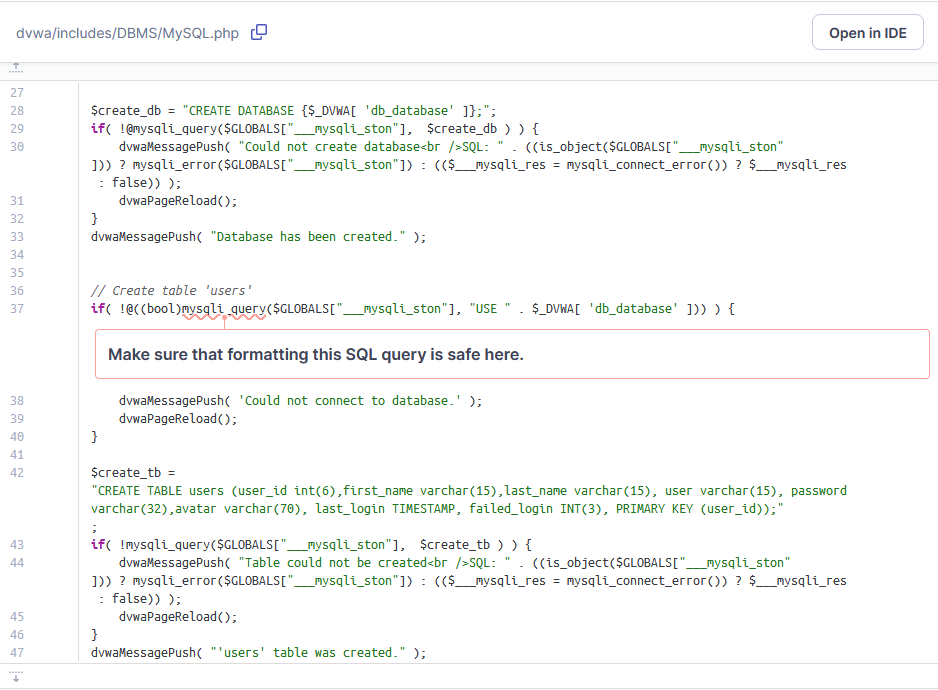
From the above image, we can see that there’s a sql injection vulnerability that is not formatted properly from a php script.
The exact location of the above vulnerability is /dvwa/includes/DBMS/MySQL.php
Problems that could arise:
-
Formatted SQL queries can be difficult to maintain, debug and can increase the risk of SQL injection when concatenating untrusted values into the query.
-
No issue will be raised if one of the functions is called with hard-coded string (no concatenation) and this string does not contain a "$" sign.
$result = mysql_query("SELECT * FROM myTable WHERE id = 42") or die('Query failed: ' . mysql_error()); // Compliant -
The current implementation does not follow variables. It will only detect SQL queries which are concatenated or contain a $ sign directly in the function call.
$query = "SELECT * FROM myTable WHERE id = " . $id;
$result = mysql_query($query);  // No issue will be raised even if it is Sensitive
Solution / fix:
-
Use parameterized queries, prepared statements, or stored procedures and bind variables to SQL query parameters.
-
Consider using ORM frameworks if there is a need to have an abstract layer to access data.
$id = $_GET['id'];
try {
	$conn = new PDO('mysql:host=localhost;dbname=myDatabase', $username, $password);

	$conn->setAttribute(PDO::ATTR_ERRMODE, PDO::ERRMODE_EXCEPTION);

	$stmt = $conn->prepare('SELECT * FROM myTable WHERE id = :id');

	$stmt->execute(array('id' => $id));

	while($row = $stmt->fetch(PDO::FETCH_OBJ)) {
		echo $row->name;
	}
} catch(PDOException $e) {
	echo 'ERROR: ' . $e->getMessage();
}
Kos KaKa Dashboard BE
Overall
 Zoom
Zoom
From the above image, kos-kaka-dashboard-be-ts contains:
- 0 security vulnerabilities
- 3 reliability issues
- 66 maintainability issues
- 1.2% duplication issues
Project Details
 Zoom
Zoom
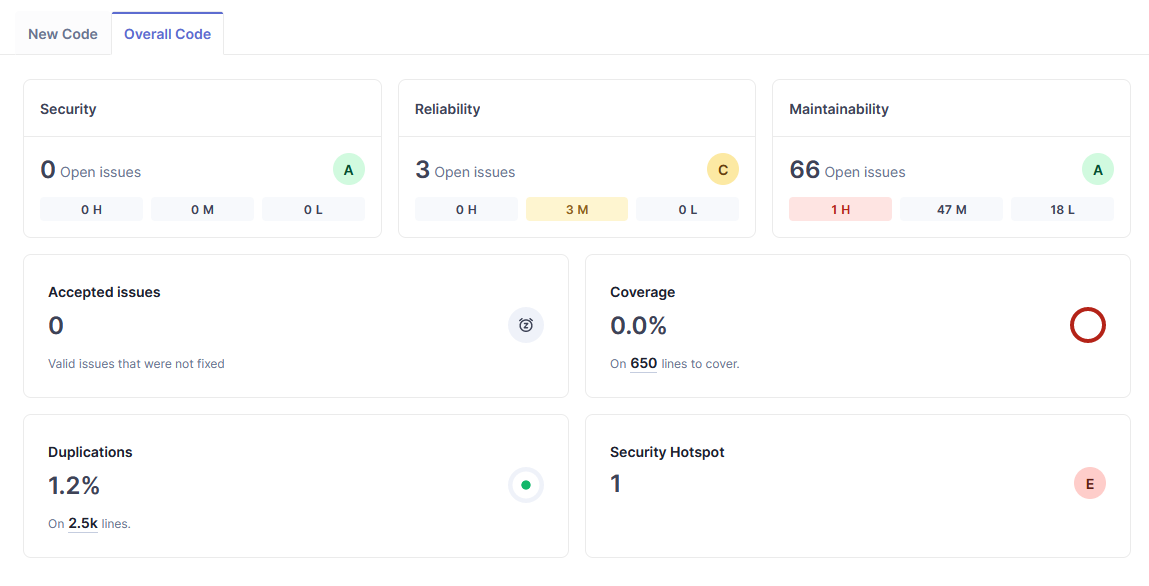
From the above image, we can see that there are:
- 0 security vulnerabilities
- 3 medium reliability problems
- 1 high, 47 medium, and 18 low maintainability problems
- 1.2% code duplications
- 1 security hotspot
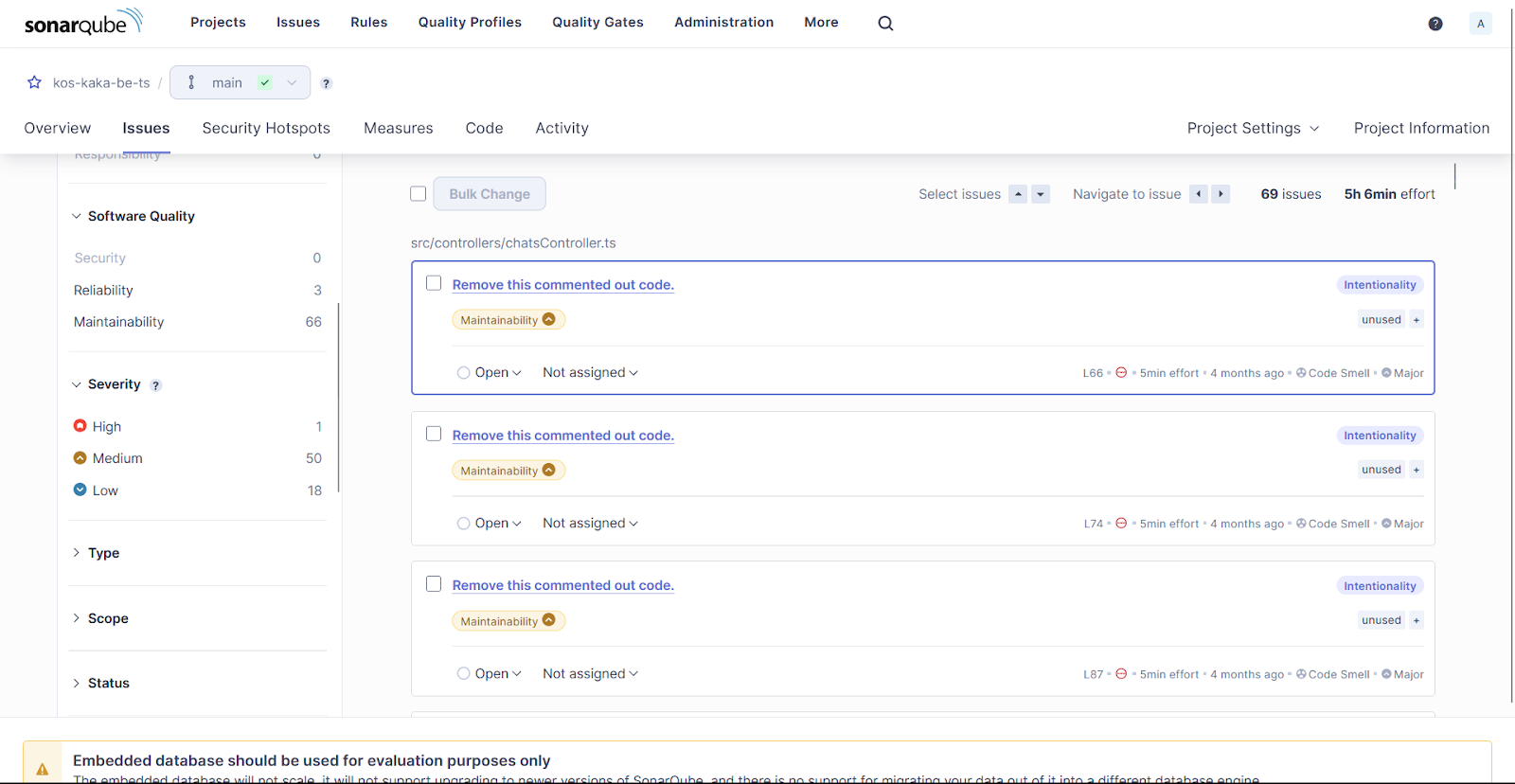
Problem List
 Zoom
Zoom
From the above results, it seems that kos-kaka-dashboard-be-ts contains:
69 issues with 1 high, 50 medium, and 18 low severity.
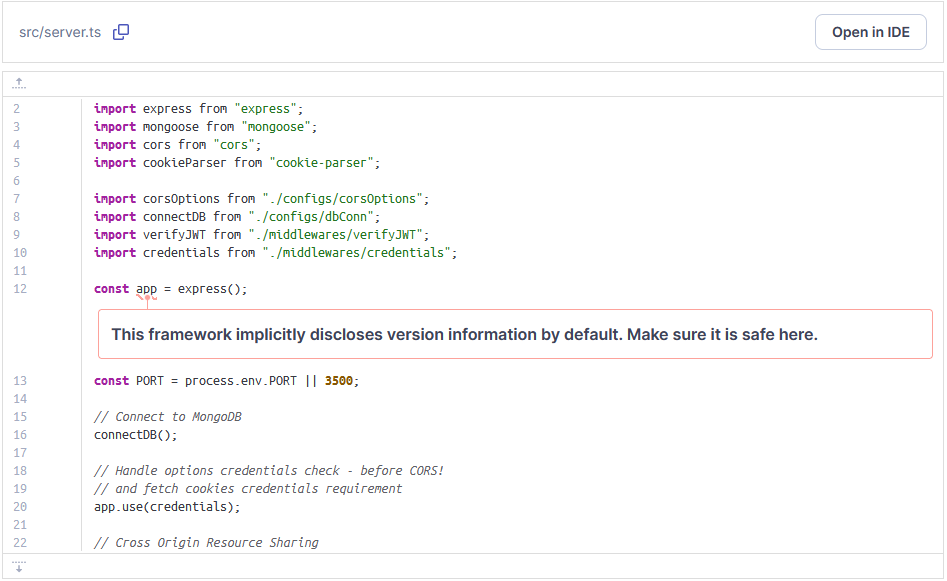
This time, we’re going to analyze the only security hotspot (low) – node version disclosure:
Node Version Disclosure
 Zoom
Zoom
From the above image, we can see that the 12th line implicitlydiscloses version information by default. We have to make sure it’s safe.
The exact location of the problem is: src/server.ts
Here’s the risk:
- Disclosure of version information, usually overlooked by developers but disclosed by default by the systems and frameworks in use, can pose a significant security risk depending on the production environment.
- Once this information is public, attackers can use it to identify potential security holes or vulnerabilities specific to that version.
- Furthermore, if the published version information indicates the use of outdated or unsupported software, it becomes easier for attackers to exploit known vulnerabilities. They can search for published vulnerabilities related to that version and launch attacks that specifically target those vulnerabilities.
Here’s how to fix it:
-
In general, it is recommended to keep internal technical information within internal systems to control what attackers know about the underlying architectures. This is known as the "need to know" principle.
-
The most effective solution is to remove version information disclosure from what end users can see, such as the "x-powered-by" header. This can be achieved directly through the web application code, server (nginx, apache) or firewalls.
-
Disabling the server signature provides additional protection by reducing the amount of information available to attackers. Note, however, that this does not provide as much protection as regular updates and patches. Security by obscurity is the least foolproof solution of all. It should never be the only defense mechanism and should always be combined with other security measures.
Code solution 1:
let express = require('express');

let example = express();

example.disable("x-powered-by"); // disables HTTP header
Code solution 2:
let helmet = require("helmet");

let example = express();

example.use(helmet.hidePoweredBy()); // disables HTTP header