JWT Explained
JSON Web Token (JWT) is a secure way of transmitting information in a web application. The information being transmitted is written in JSON format.
JWT is commonly used for:
- Authorization (most common usage): allowing users to access routes, services and resources that are permitted.
- Information Exchange: exchanged information in JSON formats could be signed with JWT to make sure the authenticity of the sender.
How JWT secures information transmission?
The information is secure because it can be verified and trusted using digital signature. There are two ways of securing the information:
- Signed tokens: verifies the integrity of the claims contained within using algorithms like HMAC.
- Public/private key pairs: encrypted tokens which hide the claims from other parties with algorithms like RSA or ECDSA.
JWT Structure
xxxxx.yyyyy.zzzzzA JSON Web Token contains:
- Header: contains type of token (i.e JWT) and the signing algorithm (e.g: HMAC, SHA256, RSA). Example payload:
{ "alg": "HS256", "typ": "JWT" } - Payload: contains claims which are statements about an entity (usually user) and additional data. Three types of claims:
- Registered claims: predefined claims which are not mandatory but recommended. e.g: iss (issuer), exp (expiration time), sub (subject), aud (audience)
- Public claims: can be defined at will, but to avoid collisions, they should be defined in the IANA JWT Registry or defined as URI which contains a collision-resistant namespace.
- Private claims: custom claims created to share information between parties that agree on using them and are neither registered nor public. Example payload:
{ "sub": "1234567890", "name": "John Doe", "admin": true } - Signature: used to verify the message wasn't changed (integrity) and if the tokens is signed with a private key, verifies the authenticity of the sender (non-repudiation). To make signature, you have to take the encoded header, encoded payload, a secret, the algorithm specified in the header and sign that. Example:
HMACSHA256(
  base64UrlEncode(header) + "." +
  base64UrlEncode(payload),
  secret)
Flow
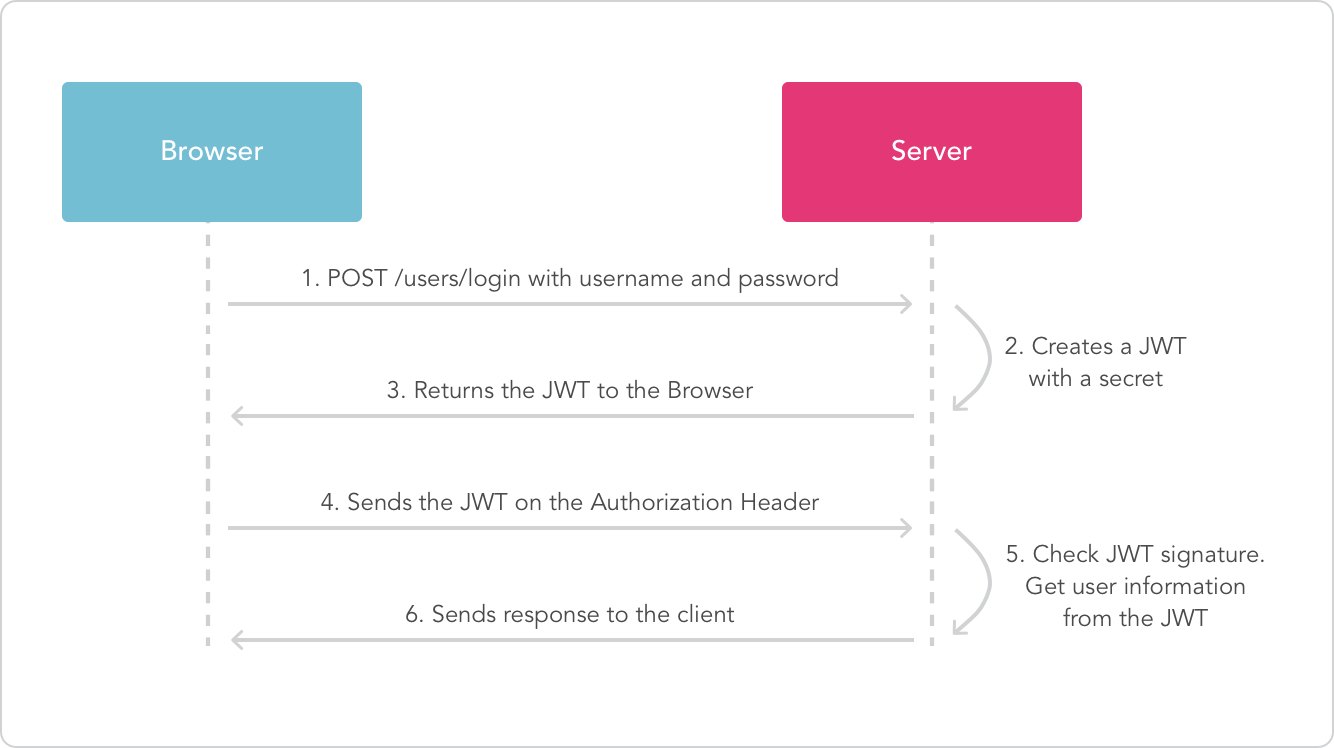
Usage flow of JWT in the browser and server is divided into several steps:
- Authentication: user logins by entering identity information (e.g: username and password) to the server. If the user is authorized, server will send JWT which contains user information.
- JWT storage: JWT that's received from the server is stored in the browser, usually in the form of browser storage like local storage or cookie.
- Authentication on request: everytime the user sends request to the server, JWT is included in the request as authentication header usually in the format:
Authorization: Bearer <token>. Server checks the JWT validity and extracts user information from the token.
 Zoom
(source: netlogica.it)
Zoom
(source: netlogica.it)
JWT Go UseCase
Github repository: https://github.com/yehezkiel1086/go-gin-jwt-oauth2