 Zoom
Zoom
Repos for this article's reference:
Microservices have become a dominant pattern in backend architecture because they offer scalability, modularity, and fault isolation. Instead of maintaining one large monolithic codebase, you can split your system into smaller, independent services that communicate with each other.
In this guide, you’ll learn how to build a simple microservice architecture in Go using Gin (for the HTTP API layer) and RabbitMQ (as the message broker). Gin will act as the entry point for client requests, while RabbitMQ will handle communication between microservices asynchronously.
By the end of this tutorial, you’ll understand how to:
- Build a REST API with Gin.
- Connect Go services using RabbitMQ.
- Create producer and consumer services.
- Implement asynchronous communication between microservices.
Why Microservices?
A monolithic architecture combines all application components — APIs, business logic, and data access — into a single deployable unit. While simple at first, it becomes difficult to scale, test, and maintain as the system grows.
Microservices, on the other hand, break the system into smaller, independently deployable components. Each service can be developed, deployed, and scaled separately.
Benefits of Microservices
- Independent deployment and scaling.
- Fault isolation — one service crash doesn’t bring down the whole system.
- Easier to maintain and evolve.
- Technology flexibility (each service can use a different language or database).
Communication in Microservices
Microservices need to talk to each other. There are two main ways:
- HTTP (REST/gRPC): Simple but synchronous.
- Message Queues (RabbitMQ, Kafka, NATS): Asynchronous and decoupled.
Message queues help microservices remain independent by allowing them to send and receive messages without direct dependencies.
Introduction to RabbitMQ
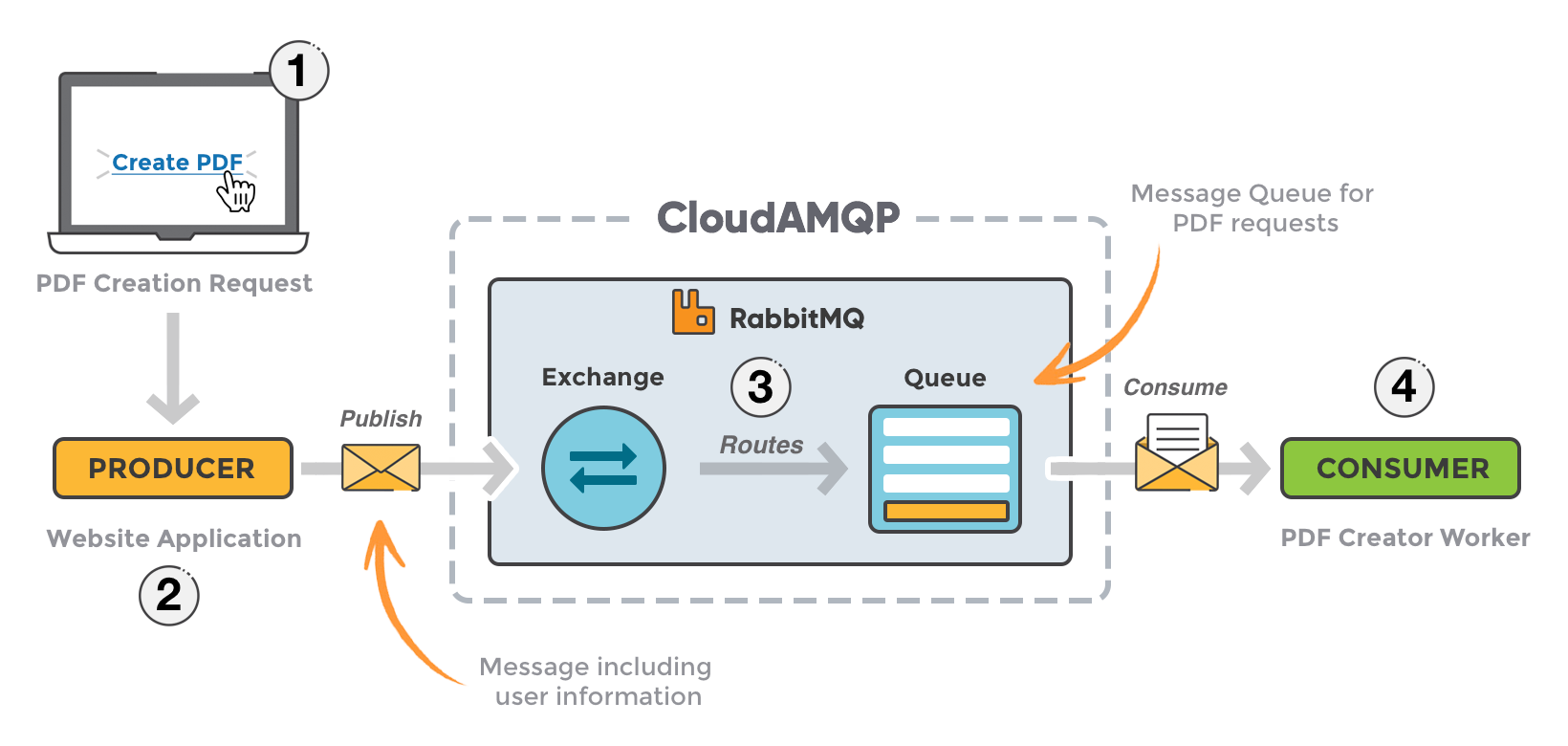
RabbitMQ is a message broker that allows applications to communicate asynchronously. Instead of sending data directly, services send messages to a queue, and other services consume those messages when ready.
Core Concepts
- Producer: Sends messages.
- Queue: Stores messages.
- Consumer: Receives messages.
- Exchange: Routes messages to queues based on rules.
RabbitMQ ensures reliable delivery, load distribution, and asynchronous processing — making it perfect for microservice communication.
 Zoom
Zoom
Setting Up the Environment
Requirements
- Go 1.21 or newer
- Docker (for RabbitMQ)
Start RabbitMQ with Docker
docker run -d --name rabbitmq \
  -p 5672:5672 -p 15672:15672 \
  rabbitmq:management
or you could also utilize the following docker-compose.yml:
services:
  rabbitmq:
    image: rabbitmq:3-management
    volumes:
      - ./rabbitmq_data:/var/lib/rabbitmq # Persist data
    environment:
      RABBITMQ_DEFAULT_USER: ${RABBITMQ_USER}
      RABBITMQ_DEFAULT_PASS: ${RABBITMQ_PASS}
    ports:
      - "${RABBITMQ_PORT}:5672" # Standard AMQP port
      - "15672:15672" # RabbitMQ Management UI port
    container_name: rabbitmq
Access the management dashboard at http://localhost:15672 (user: guest, password: guest).
Project Structure
go-microservices/
├── producer/
│   └── main.go
├── consumer/
│   └── main.go
└── go.mod
Building the API Gateway with Gin
The producer microservice will expose a REST API endpoint to receive orders and publish them to RabbitMQ.
Install Gin:
go get github.com/gin-gonic/ginproducer/main.go
package main

import (
    "context"
    "encoding/json"
    "log"
    "net/http"

    "github.com/gin-gonic/gin"
    "github.com/rabbitmq/amqp091-go"
)

type Order struct {
    ID    string `json:"id"`
    Item  string `json:"item"`
    Price int    `json:"price"`
}

func main() {
    conn, err := amqp.Dial("amqp://guest:guest@localhost:5672/")
    if err != nil {
        log.Fatal("Failed to connect to RabbitMQ:", err)
    }
    defer conn.Close()

    ch, err := conn.Channel()
    if err != nil {
        log.Fatal("Failed to open a channel:", err)
    }
    defer ch.Close()

    q, err := ch.QueueDeclare(
        "orders", false, false, false, false, nil,
    )
    if err != nil {
        log.Fatal("Failed to declare a queue:", err)
    }

    router := gin.Default()

    router.POST("/order", func(c *gin.Context) {
        var order Order
        if err := c.BindJSON(&order); err != nil {
            c.JSON(http.StatusBadRequest, gin.H{"error": err.Error()})
            return
        }

        body, _ := json.Marshal(order)

        err = ch.PublishWithContext(context.Background(),
            "", q.Name, false, false,
            amqp.Publishing{
                ContentType: "application/json",
                Body:        body,
            },
        )
        if err != nil {
            c.JSON(http.StatusInternalServerError, gin.H{"error": "Failed to send message"})
            return
        }

        c.JSON(http.StatusOK, gin.H{"status": "Order sent", "order": order})
    })

    router.Run(":8080")
}
Start the API:
go run producer/main.goSend a test request:
curl -X POST http://localhost:8080/order \
  -H "Content-Type: application/json" \
  -d '{"id":"1","item":"Laptop","price":1500}'
Connecting to RabbitMQ in Go
The producer uses the official AMQP client to publish messages. Install it with:
go get github.com/rabbitmq/amqp091-goThis library provides the tools for connecting, declaring queues, and publishing or consuming messages from RabbitMQ. Always remember to close both the connection and channel with defer statements.
Creating the Consumer Microservice
The consumer will listen for messages from the orders queue and process them.
consumer/main.go
package main

import (
    "encoding/json"
    "fmt"
    "log"

    "github.com/rabbitmq/amqp091-go"
)

type Order struct {
    ID    string `json:"id"`
    Item  string `json:"item"`
    Price int    `json:"price"`
}

func main() {
    conn, err := amqp.Dial("amqp://guest:guest@localhost:5672/")
    if err != nil {
        log.Fatal("Failed to connect to RabbitMQ:", err)
    }
    defer conn.Close()

    ch, err := conn.Channel()
    if err != nil {
        log.Fatal("Failed to open a channel:", err)
    }
    defer ch.Close()

    q, err := ch.QueueDeclare("orders", false, false, false, false, nil)
    if err != nil {
        log.Fatal("Failed to declare a queue:", err)
    }

    msgs, err := ch.Consume(q.Name, "", true, false, false, false, nil)
    if err != nil {
        log.Fatal("Failed to register consumer:", err)
    }

    forever := make(chan bool)

    go func() {
        for msg := range msgs {
            var order Order
            json.Unmarshal(msg.Body, &order)
            fmt.Printf("Received order: %+v\n", order)
        }
    }()

    fmt.Println("Consumer running. Waiting for messages...")
    <-forever
}
Start the consumer:
go run consumer/main.goNow every time you send a POST request to the producer’s /order endpoint, the consumer will print the received order.
Demonstrating Asynchronous Communication
Notice how the producer doesn’t wait for the consumer to respond. Once the message is published to RabbitMQ, the API immediately returns a response to the client.
This is the key advantage of asynchronous messaging:
- Faster response times.
- Decoupled services (the producer doesn’t care if the consumer is online).
- Natural load distribution.
Adding Reliability and Acknowledgements
By default, our queues and messages are transient. To make them durable:
q, _ := ch.QueueDeclare(
    "orders",
    true,  // durable
    false,
    false,
    false,
    nil,
)
In the consumer, you can manually acknowledge messages:
msgs, _ := ch.Consume("orders", "", false, false, false, false, nil)
for msg := range msgs {
    fmt.Println("Processing:", string(msg.Body))
    msg.Ack(false)
}
This ensures that messages aren’t lost even if the consumer crashes mid-processing.
Scaling and Load Balancing
RabbitMQ automatically balances load between multiple consumers connected to the same queue. If you run three instances of the consumer service, RabbitMQ distributes incoming messages in a round-robin manner.
You can scale horizontally simply by running:
go run consumer/main.go &
go run consumer/main.go &
go run consumer/main.go &
Each instance processes different messages concurrently.
Monitoring and Debugging
RabbitMQ includes a web management UI at http://localhost:15672 where you can:
- Monitor queues and message flow.
- Check connected producers and consumers.
- View exchange bindings and routing.
You can also enable application logs in your Go code for better debugging.
Best Practices
- Always close connections and channels with
defer. - Use environment variables for configuration (
AMQP_URL,PORT, etc.). - Use durable queues for production.
- Add retry and dead-letter queues for failed messages.
- Handle reconnection logic in long-running consumers.
- Keep message payloads small and focused (avoid sending large blobs).
Extending the System
You can easily extend this setup by adding new services:
- Payment Service: Consumes orders and processes payments.
- Notification Service: Sends email or SMS after an order is completed.
- Inventory Service: Updates stock counts asynchronously.
You can also explore advanced RabbitMQ features:
- Exchange types: direct, topic, fanout.
- RPC messaging pattern: synchronous request-response using reply queues.
Conclusion
Using Gin and RabbitMQ together allows you to build scalable, asynchronous, and resilient Go microservices. Gin handles incoming HTTP requests efficiently, while RabbitMQ provides a robust messaging layer for communication between services.
You’ve learned how to:
- Build a producer API with Gin.
- Publish and consume messages with RabbitMQ.
- Handle reliability, scaling, and monitoring.
This architecture lays the foundation for more complex distributed systems — where services are independent, fault-tolerant, and easy to scale.